
Bio locks · Residential & commercial
Doors that open for a person, not a credential.
Cards get lent out. Codes get written on the back of a badge. Keys get copied at the hardware store and nobody tells you. A face is the one credential that can’t quietly end up in somebody else’s pocket — on a front door at home, or on four hundred of them across a property.
See it work
What it actually looks like on a door
Manufacturer footage of the Ora FacePass hardware we install. Worth thirty seconds before you decide whether a face reader belongs on your entrance.
Formats
Three ways it mounts
| Format | Door it suits | Typical use |
|---|---|---|
| Double-bore deadbolt | Standard bored door, two bores | Offices, back doors, rental units |
| Video doorbell lock | Main entry, camera and intercom in the same unit | Front entrances, multi-family, short-stay |
| Multipoint mortise | Mortise prep with a multipoint strike | Glass entries and higher-security doors |
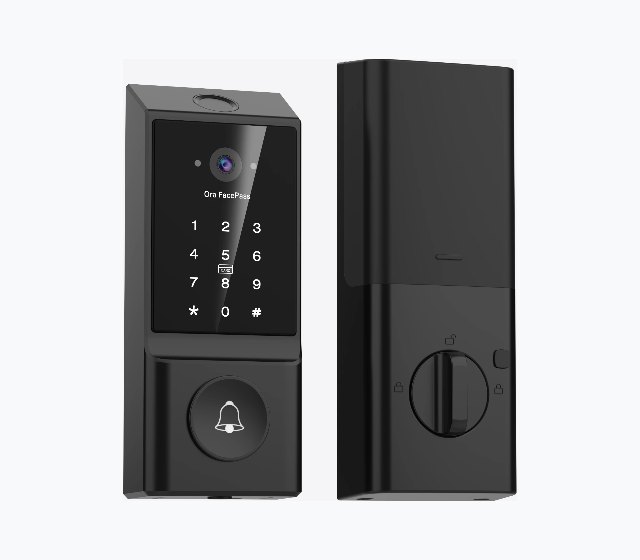
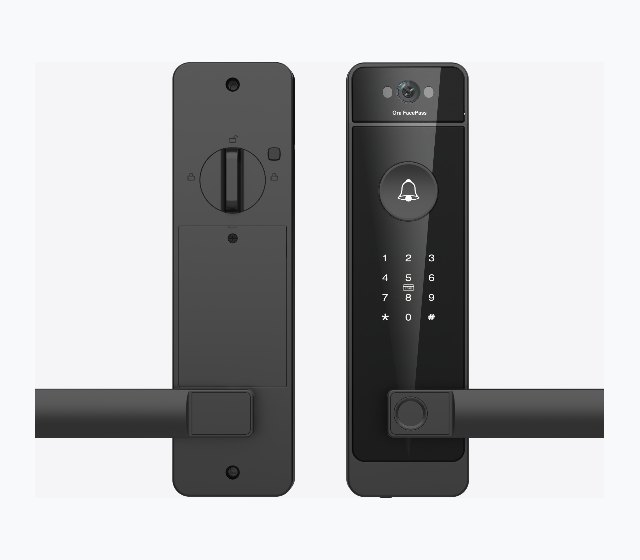
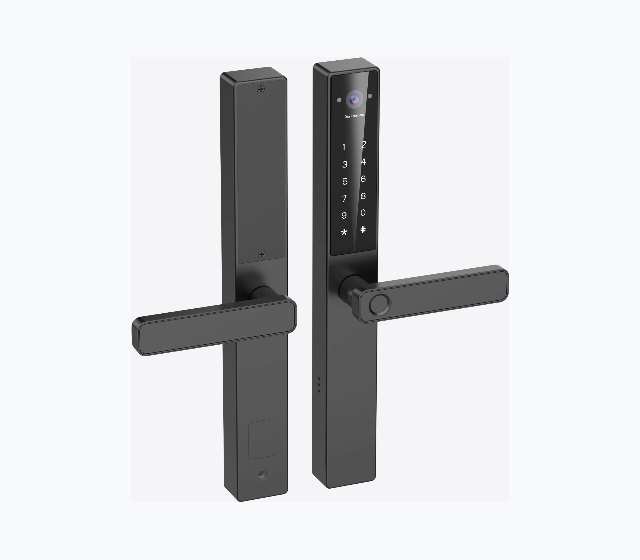
Handing, backset, door thickness, and finish all vary by unit. We measure the door before anything is ordered — a mortise lock will not go into a bored door, and that discovery is expensive on installation day.
Two jobs
The same hardware, asked to do very different things
At home the problem is convenience and the people you let in. In a building the problem is accountability — who went through which door, and how fast you can take that away. The lock is largely the same. What sits behind it is not.
Residential
Your door, your people
- —The front door. Hands full of groceries, kids home before you are, and nobody hiding a key under a rock.
- —The garage or workshop. Outbuildings that never had a lock worth the name, without running power or cable out to them.
- —Short-term rentals. A code that starts at check-in and expires at check-out, so you never meet anyone to hand over a key.
- —Cleaners and contractors. A window that closes on its own, which means nobody has to remember to revoke it.
- —Guests and family. Their own code instead of everyone sharing yours since 2019.
Commercial
Your building, your record
- —Offboarding. Someone leaves on Friday and their access is gone on Friday. No rekey, no collecting cards that never come back.
- —Zones, not buildings. Loading dock, stockroom, server closet, cash room — access defined per area rather than per building.
- —An identity on every entry. Not “a badge was used” but who used it, which is what settles a dispute.
- —Back-of-house. Kitchens, stockrooms, and pharmacy areas, where hands are full, gloved, or wet and palm or face beats a keypad.
- —Shift tracking. On the commercial platform, the same face read can serve as the time clock — no badges, no manual punches.
How it works
How the lock tells a face from a photograph of one
Two infrared cameras project an invisible grid onto whatever is in front of the door and read it back from slightly different angles. The disagreement between those two views is depth. A photo, a phone screen, and a printed mask are flat, so they never produce the spread that a real face does.
It resolves in under half a second, in full darkness or direct sun, and it keeps working through glasses, a beard, a hat, or a change of makeup.
Credentials
Eight ways through the same door
Biometrics are the headline, but the reason these work in a real building is that nobody is ever locked out. Every door keeps a fallback, down to a physical key.
- FACE3D infrared recognition in under half a second. The one that matters when someone is carrying a box in both hands.
- PALMSubdermal vein pattern — a good answer in kitchens, shops, and clinics where fingerprints read badly.
- FINGERPRINTCapacitive sensor, roughly a third of a second.
- PINUp to a hundred permanent codes, so each person can have their own instead of everyone sharing one.
- TEMPORARY CODETime-limited access for a cleaner, a contractor, or a guest. It expires on its own, which means nobody has to remember to revoke it.
- FOBRFID proximity, for the people on your team who would simply rather carry a fob.
- MECHANICAL KEYA real keyway as the last resort. Batteries die and firmware updates go wrong; the door still opens.
- MOBILE APPRemote unlock, plus a log of who came through and when.
At building scale
Hundreds of doors, one dashboard
One lock on a back door is a lock. Two hundred of them is a property system, and the difference is what happens on the manager’s screen rather than at the door. The Ora FacePass platform we install puts every door on one dashboard — issue access, revoke it, and read back who came through.
- MOVE-INA new resident or hire gets a setup link, pairs the lock, and enrolls their own face, fingerprint, or code. Nobody meets anyone in a leasing office to collect a key.
- MOVE-OUTAccess is revoked remotely and the lock reset for the next occupant. That is the line item this replaces: rekeying, per unit, every turnover.
- DUAL CONTROLResidents manage their own guests and codes; management keeps oversight of the door. Both are true at once, which is the part a keypad cannot do.
- SCHEDULED ACCESSStart and end dates per credential, so a semester, a lease, or a contract window closes itself without anyone remembering to.
- IDENTITY-BOUND LOGSEvery unlock attempt is tied to a person and stored. Useful for a dispute, a compliance review, or an incident nobody witnessed.
- TIME CLOCKIn commercial deployments the same face read can double as clock-in and clock-out, logged against a verified identity instead of a badge somebody else swiped.
Where this gets deployed
Multi-family
Unit doors plus the common doors nobody manages — mail rooms, gyms, and pool gates, where the code has been the same for years and everyone knows it.
Student housing
Built for turnover. Credentials issued digitally at the start of term and expiring at the end of it, instead of reissuing lost keys all year.
Government and affordable housing
Centralized oversight across sites, audit-ready logs, and no rekeying budget — with residents getting the same modern entry as anyone else.
Offices and suites
Per-role and per-zone permissions, instant changes for a new hire or a departing contractor, and a clean audit trail for HR and IT.
Warehouse and distribution
Dock doors, cages, and admin areas as separate zones, with access and shift time tracked against the same verified identity.
Short-stay and rentals
Guest access bounded by the booking, issued before arrival and gone after checkout, with no key handover and no lockbox on the railing.
Before you specify one
Six things we check first
Most bad biometric-lock installs fail on something dull — the door prep, the batteries, or who is supposed to delete a leaver. None of them are about the biometrics.
- 01Door prep. Bore type, backset, thickness, and handing, measured before anything is ordered.
- 02Power, and whose job it is. These are rechargeable. Someone has to own that, and you want the emergency power-bank path tested once before you need it at 6am.
- 03Offline behavior. The door must open when the internet is down. We confirm which features are local and which need the cloud, in writing.
- 04Offboarding. Who removes a face when someone leaves, and how quickly. This is the entire reason you bought it; it should not be an afterthought.
- 05Fire and egress code. Locks on egress doors are governed by code, not preference. We check with the authority having jurisdiction before specifying, not after inspection fails.
- 06Where the template is stored. On-device or in a vendor cloud. On-device keeps working when the internet does not, and it is the simpler answer if anyone ever asks what you hold and where. Ask before you buy, and get the answer in writing.
Start with one door.
Pick the door that causes the most trouble — usually the back entrance, or the one whose code hasn’t changed in three years. We will fit one, run it for a month, and you can decide about the rest from experience rather than a brochure.