
Security cameras
A camera system is only worth what its footage proves.
Most systems we’re called in to replace were installed correctly and specified badly. The cameras work. They just can’t answer the question you needed answered.
Wide-area coverage
One camera where a site used to need three
A multi-sensor panoramic camera stitches two lenses into a single 180° image, so one housing covers a whole lot, aisle or sales floor. That is one cable drop, one mount, one recorder channel and one license instead of three — and no seams between views where the thing you needed to see happens to fall.
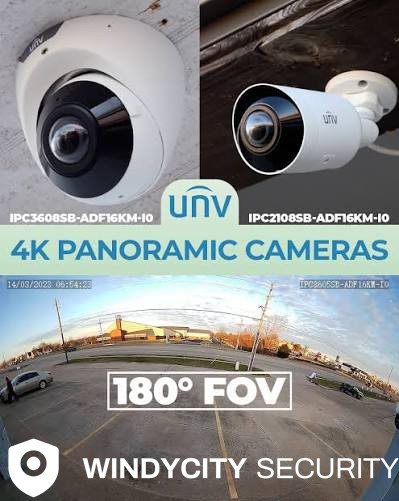
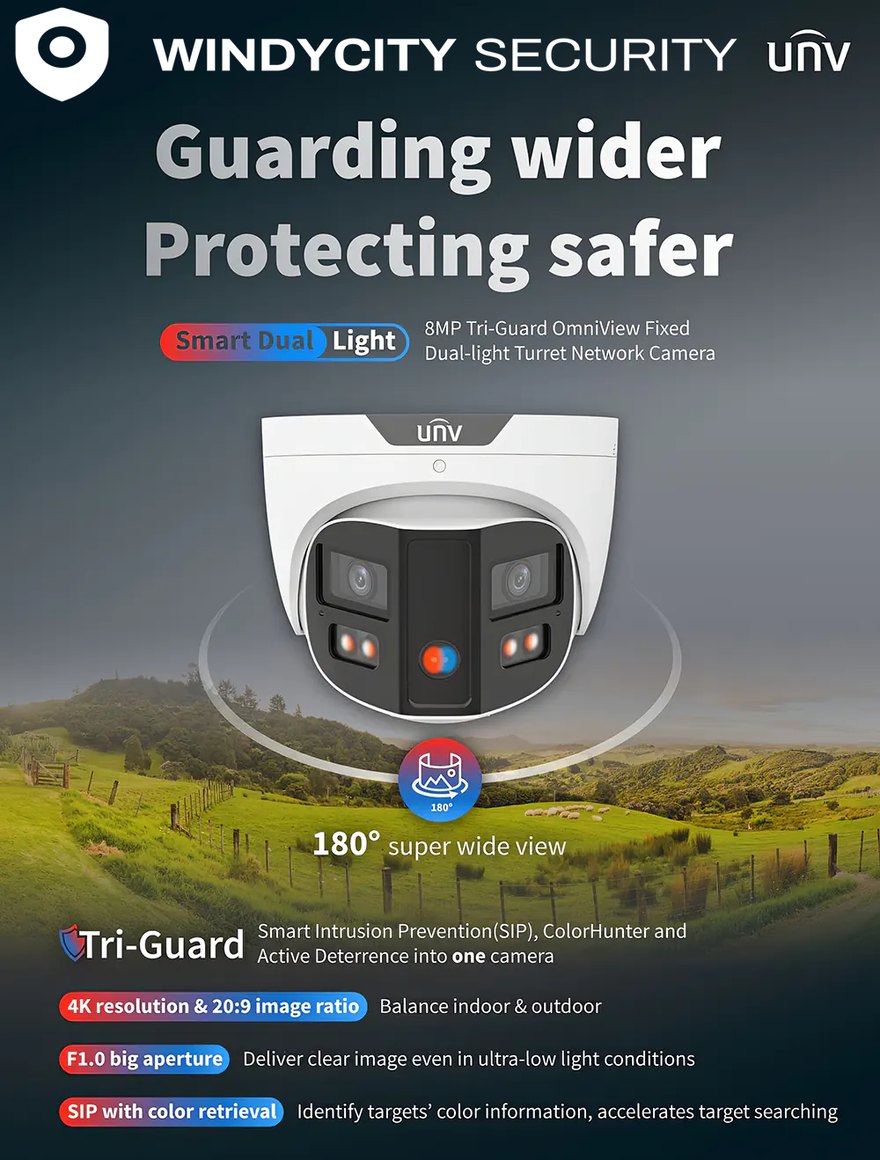
- 180°Two sensors stitched in the camera, not three separate views you have to watch side by side or line up afterwards.
- 4K / 8 MPEnough pixels across that width to still identify a face or read a door number after you crop in.
- F1.0A wide aperture, which is what actually produces usable color at night rather than the grey infrared image most cameras fall back to.
- DETERWhite light and a speaker in the housing, so the camera can respond to someone on its own instead of only recording them.
This is one family we install a lot of, shown because it is the clearest example of the trade. The specification still follows the site — a panoramic over a loading dock is the wrong answer if what you actually need is a plate at the gate.
The four ways systems fail
Where footage falls apart
- RESOLUTIONA camera mounted for coverage instead of identification. You get a person-shaped blur crossing the lot — enough to know it happened, not enough to charge anyone.
- RETENTIONThirty days sounds fine until the loss is discovered in week six. Retention should be set by how long your incidents take to surface, not by whatever the recorder shipped with.
- HEALTHA drive fails, a camera drops off the network, and nobody notices for a month. Every system we install reports its own health, and someone actually watches the report.
- LIGHTThe scene that matters is usually backlit, at night, or both. Dynamic range and IR strategy are specification decisions, not features you turn on later.
Hardware
What we specify, and when
| Camera type | Use it for | Typical placement |
|---|---|---|
| Fixed / varifocal IP | Identification at a known choke point | Entry doors, registers, safes, server rooms |
| Multi-sensor panoramic | Wide area on one cable drop and one license | Sales floors, warehouse aisles, parking decks |
| PTZ | Operator-driven follow, or preset patrol | Yards, lots, large open interiors |
| Thermal | Detection in total darkness, fence lines, smoke | Perimeters, tank farms, unlit exteriors |
| Low-light / IR | Usable color detail after dark | Loading docks, drive-throughs, back entries |
| LPR | Reading plates, not just seeing vehicles | Gates, single-lane entries, drive lanes |
We are brand-agnostic and will spec to your existing VMS where one is in place. If you have no preference, we will bring two options at different price points and explain the trade.
After hours
Cameras that someone is actually watching
A recorded camera tells you what happened. A monitored one puts a live operator on your site at two in the morning — someone who speaks to whoever is crossing your lot over a speaker, and calls police as a witness rather than as an alarm signal.
Behind the cameras
The parts nobody quotes on
The camera is the cheap part. These are what determine whether the system is still healthy in year three.
- ▶Structured cabling. Cat6 / Cat6A and fiber, tested and certified, with results handed to you — not “it lights up, we’re done.”
- ▶Power budget. PoE switches sized with headroom, so adding four cameras next year doesn’t brown out the eight you have.
- ▶Recording. On-prem NVR, cloud, or hybrid — chosen against your bandwidth and your retention requirement, not against a vendor’s margin.
- ▶UPS. Cameras that keep recording through the power blip that a break-in conveniently coincides with.
- ▶Analytics. Line-crossing, loitering, people counting, and weapon detection where they earn their keep. We will tell you when they don’t.
- ▶Handover. As-built drawings, camera schedule, credentials in your name, and training for the people who will actually pull clips.
Process
How a job runs
- STEP 01
Site walk
We walk the building with you and find out what you actually need to see. Free, and you get our notes whether or not you hire us.
- STEP 02
Camera plan
Field-of-view drawings on your floor plan, so you approve coverage on paper before anyone drills a hole.
- STEP 03
Cable and rough-in
Pathways, drops, and terminations. Scheduled around your operating hours, including overnight where retail requires it.
- STEP 04
Commissioning
Focus, exposure, masks, retention, motion zones, and analytics tuned on site — not left at factory defaults.
- STEP 05
Handover and training
Documentation, admin credentials in your name, and a session with your staff on exporting evidence properly.
- ONGOING
Health monitoring and service
Automated health reporting with a human reading it, plus scheduled maintenance. This is where most systems quietly die.
Cameras record a break-in rather than interrupt one, which is worth being honest about: what actually stops a break-in. We install across Will County and the Chicago south suburbs.